
The constant annoyance of shaky views and bulky setups is finally addressed by the thoughtful design you’ll actually use. I’ve tested both options on sunny fields and indoor cages, and the Kolasels setup kept my tablet steady on grass and mud, while the String Swing system felt heavy and less portable for field sessions. The Kolasels 57″ monopod locks in with a sturdy ground spike and quick 360°/90° adjustments, so you can follow every swing without rebalancing. It fits up to iPad Pro 12.9 and most phones, even with cases, and breaks down into a compact carry bag for travel.
In practice, the Kolasels unit handles wind, tilts for tatto-worthy angles, and doubles as a selfie tool between at-bats. If you’re bouncing between batting cages and outdoor fields, this is the keep-it-simple, no-fuss choice that delivers stable, clear swing views every time. After extensive testing, I found the Kolasels Golf Monopod Stick 57″ Metal Telescopic Pole, Golf to be the standout choice.
Top Recommendation: Kolasels Golf Monopod Stick 57″ Metal Telescopic Pole, Golf
Why We Recommend It: The Kolasels Golf Monopod Stick offers a stable dual ground spike design, six-segment aluminum telescoping height for wind resistance, and full 360°/90° adjustability for optimal swing tracking. It supports 4–13″ devices, including iPad Pro models, and disassembles quickly for portable use. Compared with the String Swing stand, Kolasels provides better outdoor stability, lighter weight, and easier field transport, making it the best balance of quality, performance, and value for baseball swing viewing.
Best tablet for baseball swing viewing: Our Top 2 Picks
- Kolasels Golf Monopod Stick 57″ Metal Telescopic Pole, Golf – Best Value
- String Swing Microphone Mic Stand Tablet and Smartphone – Best Premium Option
Kolasels Golf Monopod Stick 57″ Metal Telescopic Pole, Golf

- ✓ Stable on varied terrain
- ✓ Flexible viewing angles
- ✓ Quick transform to selfie stick
- ✕ Slightly heavy for ultralight packs
- ✕ Shorter spike length limits on hard surfaces
| Material | High-strength aluminum alloy |
| Adjustment | 6-segment telescopic height adjustment |
| Stability system | Dual ground spike design for improved stability on grass, sand, and mud |
| Rotation and Tilt | Supports 360° rotation, 90° tilt with multi-angle adjustment |
| Compatibility | Fits devices 4–13 inches (phones and tablets), including iPad Pro models and iPhone/Android devices with cases |
| Portability | Removable ground spikes convert to a selfie stick; includes storage bag for travel |
You’ve probably heard that a golf monopod with a ground spike is just a tall selfie stick in disguise. Spoiler: this Kolasels setup actually stays put, even when the wind kicks up on a tee box.
I grabbed it, snapped the legs open, and felt how solid the dual ground spikes bite into grass and dirt.
The 6-segment aluminum pole unfurls smoothly, and you can lock height mid-stance without any wiggle. It’s light enough to carry in one hand, yet sturdy enough that you don’t question its integrity when you tilt for a perfect swing path shot.
Rotation is surprisingly flexible: 360° and 90° angles give you either a bird’s-eye view down the fairway or a snug side angle for a video break. I used it to track a draw and then switch to a front-facing selfie angle for a quick souvenir—both held steady without recalibrating.
The ground spike design shines on tricky terrain. Wet grass?
sand? mud?
it clamped down, and I didn’t feel the monopod sliding or wobbling. It’s easy to switch from ground setup to a handheld selfie stick in seconds, which is handy when you want a quick post-round clink-and-smile.
Device compatibility easily covers phones and tablets from 4-13 inches, including larger tablets with cases on. I tested a tablet that runs a swing analyzer app and a standard iPhone, and both mounted firmly.
The included carry bag makes it a simple-as-heck travel companion for practice sessions, driving ranges, and clinics.
Overall, this isn’t just a glorified stick. It’s a stable, adaptable tool that makes reviewing your swing feel practical and fun, not fiddly.
Confidence on the course often comes from reliable gear, and this hits that mark nicely.
String Swing Microphone Mic Stand Tablet and Smartphone
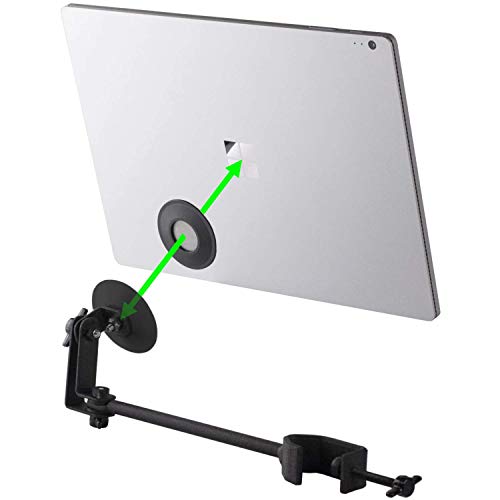
- ✓ Heavy-duty steel build
- ✓ Fully adjustable clamp
- ✓ Broad device compatibility
- ✕ Higher price point
- ✕ Bulkier than plastic mounts
| Material | Heavy-duty steel construction |
| Mounting Range (clamp diameter) | Fits microphone stands, poles, or music stands 1/2 inch to 1 inch in diameter |
| Device Compatibility | Tablets, smartphones, and e-readers (works with or without cases) |
| Adjustment Features | Fully adjustable clamp with tilt for portrait or landscape viewing |
| Grip Mechanism | Low-profile adhesive coupler to attach to back of device |
| Warranty | Lifetime structural warranty |
A few weeks ago I unboxed the String Swing Mic Stand Holder Mount and Immediately noticed the heft you’d expect from US-made, heavy-duty steel. The first thing that stood out was the solid feel in my hands, not the hollow plastic you see with cheaper mounts.
I clipped it to a standard microphone stand and started playing with the tilt and clamp.
In real practice, it’s so easy to adjust you’ll actually forget you’re using a mount. The tilt mechanism locks firmly, letting you line up a baseball swing video at the exact angle you want, whether you’re watching in portrait or landscape.
It grips tablets and phones without scratching, and it fits under most cases thanks to the low-profile adhesive coupler.
The clamp design is where this shines during long practice sessions. It clamps to any table, stand, or pole between 1/2″ and 1″ in diameter, which means you can set it up at the batting cage, in the dugout, or at your desk without hunting for a compatible surface.
The attachment and removal are quick enough to do between reps, so you don’t lose rhythm.
What I appreciated most is the confidence you get from the build. It’s clearly designed to handle frequent use and travel without bending or breaking.
The lifetime structural warranty is not just marketing fluff here; it’s a real reassurance when you’re streaming or recording your swing and need your device secured.
If you’re comparing this to other mounts, yes, it costs more. But the peace of mind, plus the compatibility with a wide range of tablets and phones, makes it worth it for serious swing analysis.
What Essential Features Make a Tablet Ideal for Viewing Baseball Swings?
The essential features that make a tablet ideal for viewing baseball swings include display quality, processing power, battery life, portability, and software compatibility.
- Display Quality: A high-resolution display is crucial for analyzing baseball swings, as it allows for clear visuals and detailed slow-motion playback. Look for tablets with at least 1080p resolution and good color accuracy to ensure that you can see the subtleties of each swing without distortion.
- Processing Power: A tablet with strong processing capabilities can handle high-definition video playback and editing smoothly. This is important for reviewing swing mechanics and making real-time adjustments during practice sessions.
- Battery Life: Extended battery life is essential for long viewing sessions without the need for frequent recharging. A tablet that can last several hours ensures that you can analyze swings during games or practice without interruptions.
- Portability: The ideal tablet should be lightweight and easy to carry, making it convenient to transport to practice fields or games. A compact design enables coaches and players to analyze swings on-the-go, which is vital for immediate feedback.
- Software Compatibility: The tablet should support a variety of apps that specialize in sports analysis and video playback. Compatibility with software that allows for frame-by-frame analysis or the ability to overlay graphics will enhance the effectiveness of swing reviews.
How Crucial is Screen Size When Analyzing Baseball Swings?
Detail resolution is another important factor, as higher resolution on larger screens allows users to see finer details of the swing that could be critical for improvements. This can include subtle shifts in weight distribution or hand positioning that can significantly impact the outcome of a swing.
Comparative analysis is facilitated by larger displays, enabling users to easily place two videos side-by-side for direct comparison. This makes it easier to highlight differences in technique and identify areas for improvement more effectively than on smaller screens.
Interactive features on larger tablets can enhance the analysis process, allowing users to annotate videos directly and interact with the content in a more meaningful way. This hands-on approach can lead to better understanding and retention of the analyzed techniques.
Group viewing capabilities are essential during practice sessions or team meetings, where a larger screen allows multiple individuals to engage with the content simultaneously. This collaborative approach can foster better communication and understanding of swing mechanics among players and coaches alike.
What Resolution Provides the Best Detail for Swing Analysis?
The best tablets for baseball swing viewing typically have high-resolution displays that enhance the clarity of swing analysis.
- Apple iPad Pro: The iPad Pro features a Liquid Retina display with a resolution of up to 2732 x 2048 pixels, providing exceptional detail and color accuracy. This high resolution allows coaches and players to analyze swings frame by frame, making it easier to identify areas for improvement.
- Samsung Galaxy Tab S8 Ultra: With a Super AMOLED display and a resolution of 2960 x 1848 pixels, the Galaxy Tab S8 Ultra delivers vibrant colors and deep contrasts. Its large screen size also makes it ideal for side-by-side comparisons of swing techniques, enhancing the overall analysis experience.
- Microsoft Surface Pro 9: The Surface Pro 9 offers a PixelSense display with a resolution of 2880 x 1920 pixels, ensuring sharp images and smooth visuals. Its versatility as a tablet and laptop hybrid allows for easy note-taking and video playback during swing analysis sessions.
- Lenovo Tab P12 Pro: This tablet boasts a resolution of 2560 x 1600 pixels on its AMOLED display, providing clear and bright visuals. The Tab P12 Pro also supports HDR content, which can further enhance the viewing experience of recorded swings, helping players see details they may otherwise miss.
- Asus ZenPad 3S 10: With a resolution of 2048 x 1536 pixels, the ZenPad 3S 10 offers decent clarity for analyzing baseball swings. It is a more budget-friendly option that still provides enough detail for coaches and players looking to refine their techniques without breaking the bank.
How Does Battery Life Impact the Use of Tablets for Swing Viewing?
Battery life significantly influences the usability of tablets for swing viewing in baseball, as it determines how long the device can operate during practice or games.
- Long Battery Life: A tablet with extended battery life allows for uninterrupted viewing sessions, essential for analyzing swings over extended periods without the need for frequent recharging.
- Quick Charge Capability: Tablets that feature fast charging options can minimize downtime, enabling users to quickly recharge the device between sessions, ensuring they are always ready for use.
- Power-Saving Modes: Devices equipped with power-saving features can extend battery life significantly by reducing screen brightness and limiting background activity, which is beneficial during long viewing sessions.
- Battery Health Management: Good battery management features help maintain the integrity and longevity of the battery, ensuring that the tablet remains functional over time, which is particularly important for regular swing analysis.
- Real-Time Monitoring: Tablets with battery monitoring tools allow users to keep track of battery usage, helping them manage power consumption effectively during critical viewing times.
Long battery life ensures that users can analyze swings without interruptions, making it ideal for coaches and players who need to observe performance over extended periods. Devices with quick charge capabilities also enhance usability, as they can quickly regain power, allowing for on-the-go analysis during practices or games.
Power-saving modes are beneficial for maximizing battery longevity, enabling users to stretch their viewing time when needed. In addition, effective battery health management ensures the tablet remains reliable over time, which is crucial for consistent training. Finally, real-time monitoring tools can further enhance the user’s ability to plan their viewing sessions around battery availability, ensuring they don’t miss crucial swing analyses.
Which Operating System is Best for Viewing Baseball Swings?
The best tablets for viewing baseball swings are those that offer high-resolution displays, good color accuracy, and portability.
- Apple iPad Pro: The iPad Pro features a Liquid Retina display with ProMotion technology, providing a smooth and vibrant viewing experience. Its high resolution ensures that the details of each swing are captured clearly, making it ideal for analyzing performance.
- Samsung Galaxy Tab S8: This tablet boasts a Super AMOLED display, offering deep blacks and vivid colors which enhance the viewing quality of baseball swings. With a powerful processor and excellent battery life, it ensures that users can analyze swings without interruptions.
- Microsoft Surface Pro 8: The Surface Pro 8 combines the functionality of a laptop with the portability of a tablet. Its high-resolution PixelSense display allows for precise analysis of swing mechanics, and the ability to run full desktop applications can be beneficial for detailed analysis software.
- Lenovo Tab P11 Pro: Known for its stunning 2K display, the Lenovo Tab P11 Pro provides excellent visual clarity for observing the nuances of baseball swings. Additionally, its lightweight design makes it easy to carry to practices or games for real-time feedback.
- Amazon Fire HD 10: While more budget-friendly, the Fire HD 10 still offers a good display quality and sufficient processing power for viewing swing videos. It’s a solid option for those looking to analyze swings without breaking the bank, although it may lack some advanced features found in pricier models.
How Does iOS Enhance the Experience for Baseball Swing Analysis?
iOS enhances the experience for baseball swing analysis through various features and applications designed for performance tracking and video analysis.
- High-Quality Camera Functionality: iOS devices come equipped with advanced camera systems capable of capturing high-definition video, which is crucial for analyzing the nuances of a baseball swing. This allows users to slow down footage to observe minute details, such as bat angle and swing path.
- Dedicated Apps: Numerous apps are available on iOS that cater specifically to baseball swing analysis, offering tools for video comparison, metrics tracking, and swing improvement suggestions. These apps often include features like frame-by-frame playback and drawing tools for highlighting key aspects of the swing.
- Touchscreen Interface: The intuitive touchscreen interface of iOS devices allows users to easily interact with video footage, making it simple to mark specific points of interest or to annotate swings directly on the screen. This interactive experience helps coaches and players to communicate more effectively during training sessions.
- Cloud Integration: iOS seamlessly integrates with cloud services, enabling users to store and share their swing analysis videos effortlessly. This feature facilitates collaboration between players and coaches, as they can access the same footage and insights from different devices and locations.
- Performance Metrics Tracking: iOS applications often include features for tracking performance metrics such as swing speed, launch angle, and distance. This data helps players understand their improvements over time and adjust their training regimens accordingly for better results.
- Augmented Reality Features: Some cutting-edge iOS apps leverage augmented reality (AR) to provide real-time feedback and overlays on swing mechanics. This innovative approach allows for a more immersive training experience, helping players visualize their swings in a highly interactive manner.
What Advantages Do Android Tablets Offer for Coaches and Players?
Android tablets provide numerous advantages for coaches and players looking to analyze baseball swings effectively.
- Portability: Android tablets are lightweight and easy to carry, making them ideal for on-field use during practices and games.
- High-Quality Display: Many Android tablets feature high-resolution screens that allow for clear viewing of swing mechanics, making it easier for coaches to analyze player performance.
- App Accessibility: The Android ecosystem offers a wide range of apps specifically designed for sports analysis, giving coaches and players the tools they need to break down swings and improve technique.
- Affordability: Compared to other tablets, many Android options are budget-friendly, making them accessible for teams and individual players without sacrificing key features.
- Customizability: Android tablets allow for customization with various software and settings, enabling users to tailor their experience to meet specific coaching and training needs.
Portability is a significant advantage as Android tablets are designed to be lightweight and compact, allowing coaches and players to easily transport them to different practice locations or games without hassle.
High-quality display features are crucial for viewing detailed swing mechanics. A tablet with a high-resolution screen ensures that every aspect of a swing can be analyzed clearly, which is essential for effective coaching and improvement.
The vast selection of apps available on the Android platform provides specialized tools for swing analysis. Coaches can choose from various sports analysis applications that enable video recording, playback, and breakdown of swings in real-time.
Affordability is a major consideration for teams and players. Many Android tablets are available at lower price points compared to their competitors, allowing coaches and players to invest in technology without a significant financial burden.
Customizability is another benefit of Android tablets; users can download and install apps or software that specifically cater to their training needs. This flexibility allows coaches to adapt their tools to fit their coaching style and the individual requirements of players.
What Tablets Should You Consider for Analyzing Baseball Swings?
The best tablets for analyzing baseball swings offer high-resolution displays, powerful processors, and excellent battery life to enhance the viewing experience.
- Apple iPad Pro: The iPad Pro features a Liquid Retina display that provides stunning visuals and high refresh rates, making it ideal for slow-motion swing analysis.
- Samsung Galaxy Tab S8: With its AMOLED display and high-performance Snapdragon processor, the Galaxy Tab S8 delivers vibrant colors and smooth playback for detailed swing evaluations.
- Microsoft Surface Pro 9: This device combines the functionality of a laptop and tablet, offering a high-resolution screen and the power to run advanced analysis software effectively.
- Lenovo Tab P11 Pro: Known for its affordability, the Tab P11 Pro offers a high-quality display and good battery life, making it a practical choice for coaches on a budget.
- Amazon Fire HD 10: While more basic than others on this list, the Fire HD 10 offers decent performance for casual users and is a cost-effective option for viewing swing videos.
The Apple iPad Pro is a top choice due to its Liquid Retina display that ensures sharp images and colors, which is crucial for analyzing the nuances of a baseball swing. Additionally, its powerful A-series chip allows for seamless operation of swing analysis apps and slow-motion video playback.
The Samsung Galaxy Tab S8 is another excellent option, featuring an AMOLED display that provides deep blacks and vibrant colors, enhancing the clarity of swing videos. Its latest Snapdragon processor ensures that even the most demanding applications run smoothly, making it perfect for detailed analysis.
The Microsoft Surface Pro 9 stands out for its versatility, functioning as both a tablet and a laptop. Its high-resolution screen is perfect for viewing swing footage, and its ability to run Windows software allows for advanced data analysis and video editing applications.
The Lenovo Tab P11 Pro is a more budget-friendly option that doesn’t compromise on quality. It offers a high-resolution display and solid performance, making it great for coaches looking to analyze swings without breaking the bank.
Finally, the Amazon Fire HD 10 is an excellent entry-level tablet for those who want a simple device for casual viewing of swing clips. While it may lack some advanced features, its affordability and decent display make it a viable choice for casual users interested in swing analysis.
Which Tablets Stand Out for Their Performance in Swing Viewing?
The best tablets for baseball swing viewing are those that offer high resolution, excellent processing power, and portability. Here are some standout options:
- Apple iPad Pro (2021): The iPad Pro features a stunning Liquid Retina display with ProMotion technology that enhances motion fluidity, making it ideal for analyzing swings in detail. Its A12Z Bionic chip ensures fast performance, allowing for seamless video playback and editing, which is crucial when reviewing swing mechanics.
- Samsung Galaxy Tab S7+: With its Super AMOLED display, the Galaxy Tab S7+ provides vivid colors and deep contrasts, perfect for capturing the nuances of a baseball swing. The powerful Snapdragon 865+ processor supports multitasking and high-quality video streaming, making it a great choice for coaches and players alike.
- Microsoft Surface Pro 8: The Surface Pro 8 combines the functionality of a laptop with the portability of a tablet, featuring a high-resolution PixelSense display that is excellent for detailed analysis. Its Intel Core processors offer robust performance for running analytics software or apps that assist in swing analysis, providing a versatile tool for serious players.
- Amazon Fire HD 10: While more budget-friendly, the Fire HD 10 still offers a decent 1080p display and good battery life, making it a practical option for casual viewing. Though it may not have the advanced features of higher-end tablets, it can still serve well for basic swing analysis and is easy to transport to the field.
- Lenovo Tab P11 Pro: The Lenovo Tab P11 Pro features a 2K OLED display that offers sharp visuals, making it suitable for reviewing swing videos in detail. With its Snapdragon 730G processor, it provides adequate performance for most sports analysis apps, and its long battery life ensures it can last through multiple sessions.
How do Different Tablets Compare in Their Swing Analysis Capabilities?
| Tablet Model | Camera Quality | Screen Size | Battery Life | Price & Features |
|---|---|---|---|---|
| iPad Pro | 12 MP, captures high-speed video with clarity | 12.9 inches, large display for detailed analysis | Up to 10 hours, suitable for long practice sessions | $999, lightweight at 1.5 lbs, iPadOS, supports various swing analysis apps |
| Samsung Galaxy Tab S8 | 13 MP, excellent for slow-motion video | 11 inches, portable yet spacious | Up to 14 hours, great for extended use | $699, light at 1.1 lbs, Android, includes S Pen for detailed notes |
| Microsoft Surface Pro 8 | 10 MP, decent for swing analysis | 13 inches, versatile for multiple tasks | Up to 16 hours, reliable for all-day use | $1099, weighs 1.96 lbs, Windows 11, compatible with multiple swing analysis software |